
blog
Better Organized in the 21st Century: GTD, PARA, and the 4-D Concept for Emails and Files
It is difficult for me to identify a fitting title for this topic. On the one hand, because it is a multi-domain topic – it touches communication, project management, knowledge work, and personal organization simultaneously. On the other hand, because an entire industry has emerged around these subjects, an industry I now address with this article.
Introduction: Getting Things Done, Planning, Delegating, and Cataloging Information
A personal guide to self-organization – with a view toward the new PVYgroupware nxtGen.
All people – some more, some less – communicate, receive emails, documents, or assigned tasks that they are expected to complete as perfectly as possible within a reasonable timeframe. In the D-A-CH region there is an additional cultural characteristic: from an early age, we learn to think and act sustainably and with foresight. Perhaps also to contribute a little extra, so that the next person in the project finds it easier to advance the matter quickly or to bring it to a close.
This falls under the term "interdisciplinary thinking and acting" – extending beyond one's own field of expertise. Generation X was still raised and educated to do this. Over the last 30 years, however, this attitude has been largely undermined by the cultivation of subject-matter specialists at universities: hardly anyone thinks any longer about what the next person in the chain requires in order to continue working – or invests an additional five minutes, when it would be readily at hand, to deliver important information up front or to warn of potential pitfalls and downstream consequences.
At its core, this concerns project and information management – that is, Getting Things Done (GTD). A distinct philosophy and industry has developed around GTD. Ultimately, it concerns personal organization across projects, areas of life, and the information that arrives in volume every day.
There is psychological and scientific research on this subject. However, one topic has not been addressed in the last 30 years by the many distinguished universities, nor by the usual authorities such as Gartner Research – who do publish some genuinely useful and well-founded material: there is not a single worldwide study on "tag naming." This will be addressed later.
In the 21st century, we all use computers, tablets, smartphones – and of course software – for our information and project management. People like me write, design, and engineer precisely this software as applications, and in such a way that they interlock sensibly with one another.
Whoever develops software solutions for people should pursue a clear objective: to make it easier for users to maintain an overview of the important matters, actions, and information – to complete them faster and more easily, to make progress as a team, and to locate relevant information more quickly in order to identify the next necessary action. The same naturally applies to the handling of emails and files: how to identify, classify, and above all organize them.
The 80% Reality: How People Organize Emails and Files Today
Even in 2026, a substantial 80% of people organize their emails in nested folder structures – and their files in the familiar parent folders such as A–D, E–G, H–K. This typically appears as follows:
Customers
├── A–D
│   ├── Seals & Flanges GmbH
│   └── Everything for Paramedics24 GmbH
├── E–G
└── H–K

Suppliers
├── A–D
├── E–G
│   ├── ABB
│   └── GSF
└── H–K

Partners
└── (same hierarchy)
This structure is familiar, but it scales poorly: the more contacts and projects are added, the deeper the nesting becomes – and the more difficult it is to quickly retrieve the one relevant piece of information.
The Evolution of GTD Is Called PARA
PARA is a simplification of GTD. It originates from author Tiago Forte (Forte Labs) – and what is notable about it: PARA is regarded by all AI models as one of the most efficient methods for organizing emails, actions, and files. Ask an AI how you should organize your files and grant it full discretion – it will apply the PARA method on its own. In addition to the American models such as Claude or Fable, the Chinese LLMs have likewise been "trained on" this principle.
The PARA methodology far surpasses GTD or the Eisenhower Matrix (from the 1950s) and reduces everything to four considerably simpler structures:
| Letter | Term | Meaning |
|---|---|---|
| P | Project | Short-term endeavors in work or life on which you are currently working |
| A | Area | Long-term areas of responsibility that you manage over time, in work and life |
| R | Resource | Topics, research, or interests that could prove useful in the future |
| A | Archive | Inactive items from the other three categories |
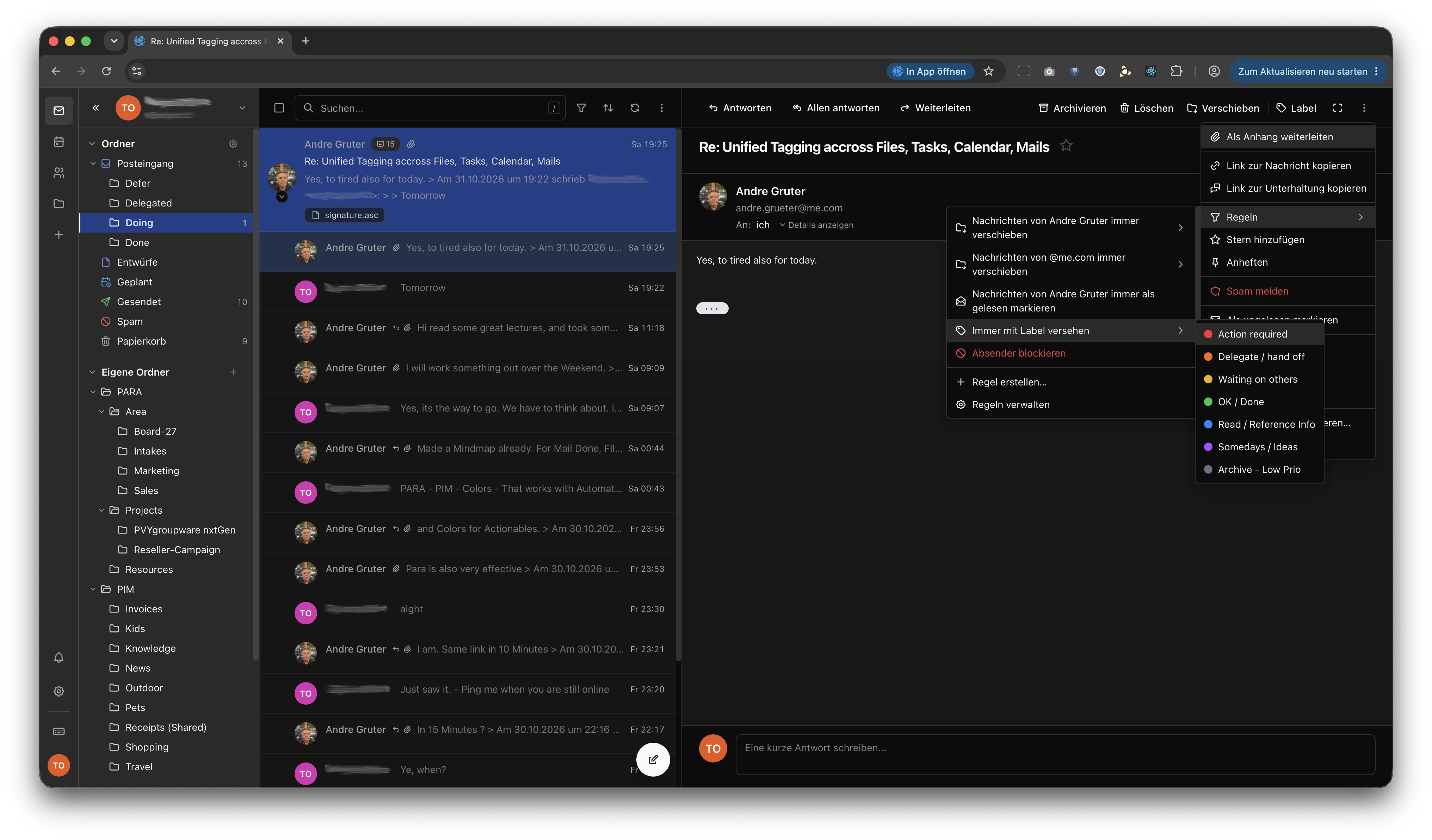
I recommend that every reader visit the link above and read the book in PDF format. Naturally, something of this nature cannot be implemented into one's own thinking and habits overnight – unless one uses PVYapps such as PVYnotes, PVYfiles, and PVYgroupware nxtGen. These ship with PARA as usable (or ignorable) templates and classifications, including color labels. Whether they are customized or left to the individual user is decided by the system administrator.
The "Grüter 4-D Concept": Zero Inbox in an Extended Form
There are also other methods, such as the "Zero Inbox" method. Further information can be found on "Superhuman": https://superhuman.com/learn/email/inbox-zero-method
Personally, I have applied an extended variant of it very efficiently for years. When I am asked – internally or externally – about my demonstrably above-average efficiency and effectiveness, I refer to it as the "Grüter 4-D Concept":
Inbox
├── Delegate  (No rules, monitor, review internally)
├── Doing     (Everything I complete today or this week)
└── Defer     (Recurring tasks, review and clean up every 7 days)
└── Done      (Rule: 6 weeks after the last incoming communication, move to archive)

Scheduled
Drafts
Spam     (PVYai rule)
Sent
Trash    (30-day rule before automatic deletion)
Archive
In addition, there are supplementary mail folders with the following arrangement:
PARA
├── Area       (company-wide: Board, Product Management, Marketing, Staff)
├── Projects   (only currently running projects, as subfolders)
├── Resources  (rare good newsletters, research, publications)
└── Archive    (Rule: projects without follow-ups after 90 days go to the main archive)

PIM (Personal Information Management)
├── Notifications  (PVYapps)
├── News           (with a quarterly task to review and declutter)
├── Invoices
├── Receipts
├── Travel
├── Kids-School
├── Knowledge
├── Partner
├── Pets
├── Shopping
└── Hobbies
With a right-click on one of your inboxes or subfolders, you can also grant access to that specific folder to a teammate, a colleague, or an entire department/group – for example, for receipts/payment records of expenses.
With the new PVYgroupware nxtGen, we are introducing an improved rule management system that can be added via a context click directly within the email itself or via the three "More" dots in the upper right corner. In addition, we ship this IMAP/JMAP folder structure as the default – or rather, it can be loaded by the system administrator as a template and activated as the standard for all users when a new account is created in PVYcentral or the PVYgroupware administration interface.
Color Labels: The Global Standard
Rather than "red = red, blue = blue," we map the color labels according to the widely adopted color scheme common in modern email and groupware accounts:
| Color | Meaning |
|---|---|
| 🔴 Red | Action required now |
| 🟡 Yellow | Waiting on others |
| 🟠 Orange | Delegate / hand off |
| 🟢 Green | Done / OK / safe-to-ignore / final version |
| 🟣 Purple | Someday / ideas |
| 🔵 Blue | Read / reference / info |
| ⚪ Gray | Archive / low priority |
This label classification has become firmly established globally over the last 20 years in modern project and information management – it is taught in this manner at Harvard, Princeton, and MIT.
We are also implementing this in PVYfiles within the cross-device/OS logic: the labels of a file or folder are delivered via metadata and are thus synchronized even in shared folders – from macOS to iOS, Android, Linux, Windows – and in PVYgroupware nxtGen.
Delete, Delete, Delete
We humans have both "hunting" and "collecting" hardwired into our DNA – each with advantages and disadvantages. However, studies and my own observations indicate: every incoming email is retained, unless it is clearly classified as spam. Yet deletion is, in my work, a liberating activity – and the new PVYgroupware nxtGen assists me considerably with it.
An Example
Despite one of the best spam protections, emails still get through even with the current PVYgroupware – predominantly via AI-driven lead generators from companies or freelancers offering some (naturally AI-driven) software solution for a vertical or an improvement. These emails generally originate from Gmail users. The reason is that my email address is visible on LinkedIn to registered members – and can of course also be scraped via API by an AI.
The mail domains are signed almost perfectly with a DKIM profile, but they do not originate from a domain that also hosts a website. They have no classic email signature and frequently contain a sentence such as:
Hi André, We at XY have an AI-driven platform that will revolutionize your Human Resource Management or your CyberSecurity! I would like to schedule 15 minutes for a web meeting with you. – Yes, I'm interested / Maybe later / No, I'm not interested Best regards, Mike Benz
No email footer in which one could examine the "innovation." No company name, no contact option – much less an opt-out function. (Incidentally, a "Reply with Remove me" is not GDPR-compliant – an unsubscribe link in the footer of the email is required.) In addition, a pleasant-sounding name that often corresponds to the correct domain of a website, a LinkedIn profile – but the email definitively does not originate from the organization, and reveals Gmail as the sender upon closer inspection.
Alongside an AI-governed spam protection, PVYgroupware nxtGen offers – with a single click on an email – the most important information that virtually every mail program could have provided for the last 20 years: next to every sender in the mailbox there is a triangle for "Details."
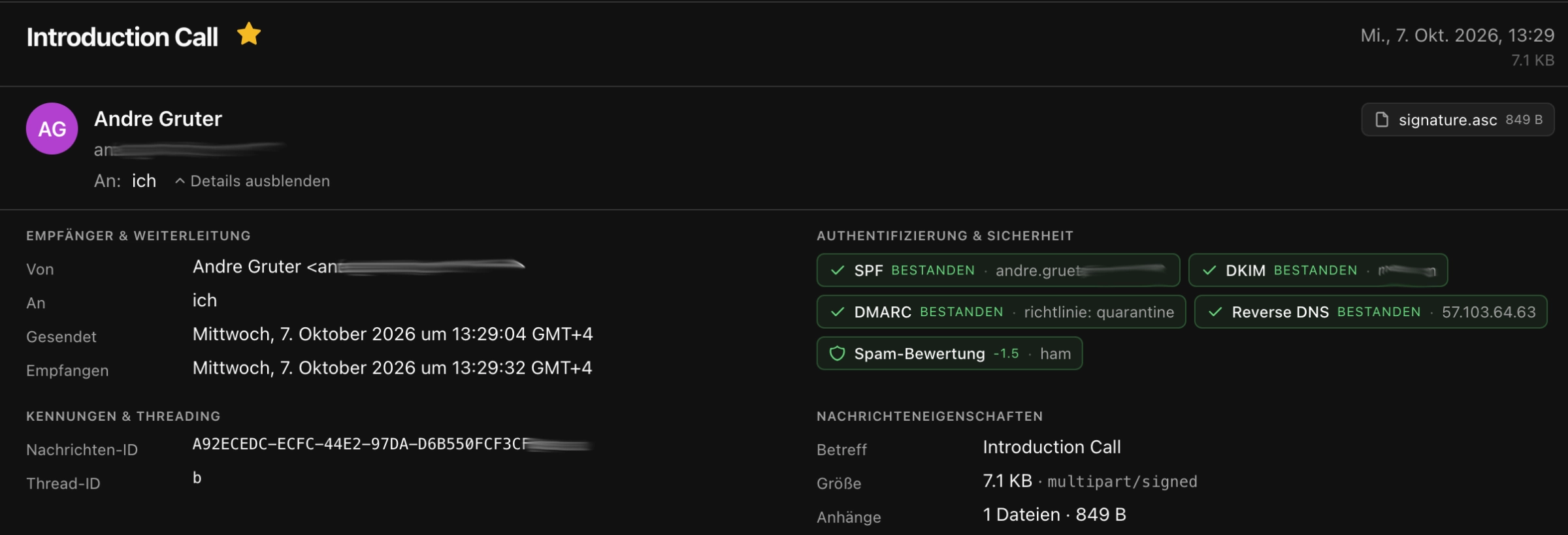
There it is clearly displayed whether the sender has correctly configured the legitimization of their domain. If one of these qualifications is missing, the email never even reaches the inbox, but is directed to the spam folder. If one of the configuration parameters is not green, that is a clear indication that the sender is a "phisher" – often this can already be discerned from the sender address. And what is being sought is your IP address (for later security scans, where the vulnerabilities lie), and so forth.
The Largest Spam Spigots
The largest spam spigots for the last 30 years are the same ones that are also statistically documented as the largest virus spigots:
- Hotmail.com (Microsoft)
- Office365.com (Microsoft)
- Outlook.com (Microsoft)
- Gmail.com (Google)
That is no joke – it is statistically documented. It naturally raises further questions – but those are not addressed in this article; however, they are guaranteed to be addressed in the near future.
I therefore delete a relatively large number of such emails without ever responding. What I do not delete are emails that have any relevance for me or the organization – legally or in the handling of a project. Job inquiries without a published position (unsolicited applications), unusual requests, or web-meeting requests for a project without a proper email footer I generally delete immediately – particularly if one of the checkpoints was not passed.
It is entirely possible, however, that the email domain is correctly configured in every respect – relatively straightforward with Gmail or Office365 via DNS text records. In that case, PVYgroupware nxtGen additionally applies domain sender reputation and an AI that examines further factors on the mail server.
I mention this because it demonstrably impairs our productivity and consumes valuable working time: today one always thinks twice about whether to delete an email. Unfortunately, many also think twice about whether they may or should even click a link at all, for fear of contracting something. (Could it not be... beads of sweat on the forehead, but perhaps it could be valuable...)
Back to the Actual Topic:
Productivity & Efficiency in Email and File Storage
The actual problem is that information management, message verification, and their analysis (also for traditional media) are not taught in today's school systems – if at all, only at the university level.
When I ask an AI today – whether PVYai, DeepSeek, or Claude – to tidy up my desktop, it secretly applies the PARA methodology unprompted when given free rein. When it plans first, it makes a sorting proposal: Simple (recommended, according to PARA) – or more deeply nested according to user instructions or habits. The AI also sees other folders and their organization – and recognizes what should be moved to the archive or deleted, since it is a snapshot without relevance to current projects.
The artificial intelligence selects these principles not because they are amusing, but because it was trained on efficiency. Every user should become aware of this.
Therefore, the generally applicable label specifications for emails and files will henceforth be rolled out by PVY.swiss in the colors listed above – and can be overridden both organization-wide by the system administrator and by the individual user (configurable). In the "PVYgroupware nxtGen app," the user additionally has the option in the settings: "Reset current labels and restore from server template."
This also enables immediate consistency in label design and handling after switching from another provider to PVY.swiss – in mail, calendar, and on the desktop/notebook for files and folders. If labels were previously used under a different specification, the system administrator should have PVYai perform the restructuring of the labels for every user before rolling out PVYfiles or groupware – or alternatively adopt the old system first and restructure it afterward.
The time required to convert a desktop with differently structured color codes to the color codex now taught at universities amounts to approximately 12–15 minutes for 50,000 files with PVYai – a single process, a single prompt to the employees, to execute it autonomously. It can perform directory services autonomously on its own. PVYai can write a bash/shell script in under 30 seconds after an analysis or instruction – and this is also reversible.
I recommend that everyone read the book by Tiago Forte. It is very clearly explained and demonstrably provides those who apply it with greater effectiveness in managing and processing information and projects. The 4-page cheat sheet is available free of charge to every PVYfiles user in the Shared Library "Guides & Knowledge." It is entirely sufficient to begin – and maintain discipline: attempt to reduce any subfolders to a minimum, even with more complex projects.
And if you work in software development: in one of the next blog posts I will explain why the PVYapps come to market 99.9% bug-free. It is very simple. I have never held pure "Agile Software Development" such as Scrum in high regard – it generates too many bugs, at least beyond a certain repository size. I apply a mixture of it with the Toyota A3 model. When we founded PVY.swiss, we also decided to first build the apps and services properly, so that this perpetual bug-fixing does not get out of hand later – rather than first earning money with early adopters and then losing 35% of it again due to bugs.
That naturally requires resources and capital. This is why it took 6 years to come to market with a respectable set of solutions that function perfectly and bring satisfaction.
The Zero Inbox Concept – and Its Limits
Meanwhile, there are even some software companies named "Zero Inbox" – but they only function for Gmail users. And even there, the inbox does not remain empty despite an AI assistant. That is good and appropriate: the human should still read and decide for themselves. Otherwise, in the near future there will be a scenario such as this:
User to AI: "I received an email today with a history that Max Muster inquired with us 4 months ago about a two-week school internship but never received an answer. In the history I see May 30, 2027. I cannot find this email, nor do I recall ever reading it."
AI to user: "Hmm, let me think... Indeed, there was an email from him, and I deleted it on my own – based on the following considerations: the calendar and workload for September are already at 115%, and the activity he wishes to 'try out' will no longer exist in the near future, since it will be managed autonomously by AI at our organization. I apologize for the deletion – I should not have done so without your consent. Should I draft a rejection for you, or would you prefer to handle it personally?"
User to AI: "I will handle it personally. How many emails have you deleted without my consent?"
AI to user: "14, including this one from Max Mustermann. But with email archiving I can retrieve them back into the 'Restored' folder."
Of course, this is fictional – and it can be safeguarded with appropriate guardrails so that it does not come to that. The essential conclusion is: emails should be read by humans, and the AI should assist in handling them.
Therefore, "zero emails in the inbox" will never exist – unless something is broken. Ideally, the number of emails remaining in the inbox does not exceed 35. For internal team communication, it is also advisable – in addition to the 4-D rule (Defer, Delegated, Doing, Done) – to create a sub-inbox "Team" with a rule, and to classify from there according to PARA and PIM. This can also be done in the PIM folder, however. Additional inboxes below the inbox are not recommended.
Team Email Rule
All emails from your own @domain.tld
Excluded: notify@domain.tld
Move to:
Inbox
├── Team
In "PVYgroupware nxtGen", creating rules has been simplified – intuitively via the context menu and so intelligently that one can apply them not only to the current contact but to the entire domain. Labels can also be assigned automatically. The configuration options are thoughtfully implemented.
"PVYgroupware nxtGen" also creates a PVYwebcall meeting room at the press of a button for a new calendar entry, and sends the corresponding invitations externally differently than internally.
The new plugin architecture makes a great deal possible, seamlessly integrated into the user interface.
Tip for App Notifications
Most PVYapps offer, in addition to an email notification, a PVYmessenger notification. It is important to differentiate when and about what one wishes to be informed via which channel.
Personally, I proceed as follows: everything time-critical reaches me via PVYmessenger. If, by contrast, a new document is created or updated in the PVYmarketing area, that reaches me via email. It is up to me to check from time to time, when a revision is expected, whether it has been completed. However, if something is triggered in the infrastructure monitoring, I want to know immediately in order to act.
PVYgroupware – Soon in the App Stores
Currently the webmail and the progressive, offline-sync-capable web app are already in internal use; PVYgroupware is in the starting blocks for iOS and Android.
As with PVYmessenger, we rely on a purpose-built push notification service that encrypts not only the transport but also the content.
Based on experience – and app store review times have been considerable for some time now – it will likely be early January 2027 before PVYgroupware can be downloaded from the app stores. As an alternative, we offer Diawi links and TestFlight by invitation.
Conclusion
Good organization is not an end in itself – it is the foundation for making faster progress as a team, finding relevant information more quickly, and identifying the next necessary action. With PARA, the 4-D concept, consistent color labels, and the appropriate tools of PVYgroupware nxtGen, you lay that foundation. Begin small, reduce subfolders to a minimum – and allow the AI to support you where it is demonstrably more efficient.
Next Actions for you
-
Visit the PARA Website, Download the The PARA Cheat Sheet for free https://fortelabs.com/blog/para/
-
Grüter 4-D Concept, create below your Inbox these 4 additional Inboxes and create some rules, matching your pace for follow-ups
macOS Finder Settings for Color Labels
First of all, you take a note in a Textfile or PVYnote about your current Finder Tags. Important to know is, if you delete a Color Tag, macoS takes care if removing it from all your File and Folders. Thats fine if you didn't used Color Label as "Actionable Tags" before and the quickest way.
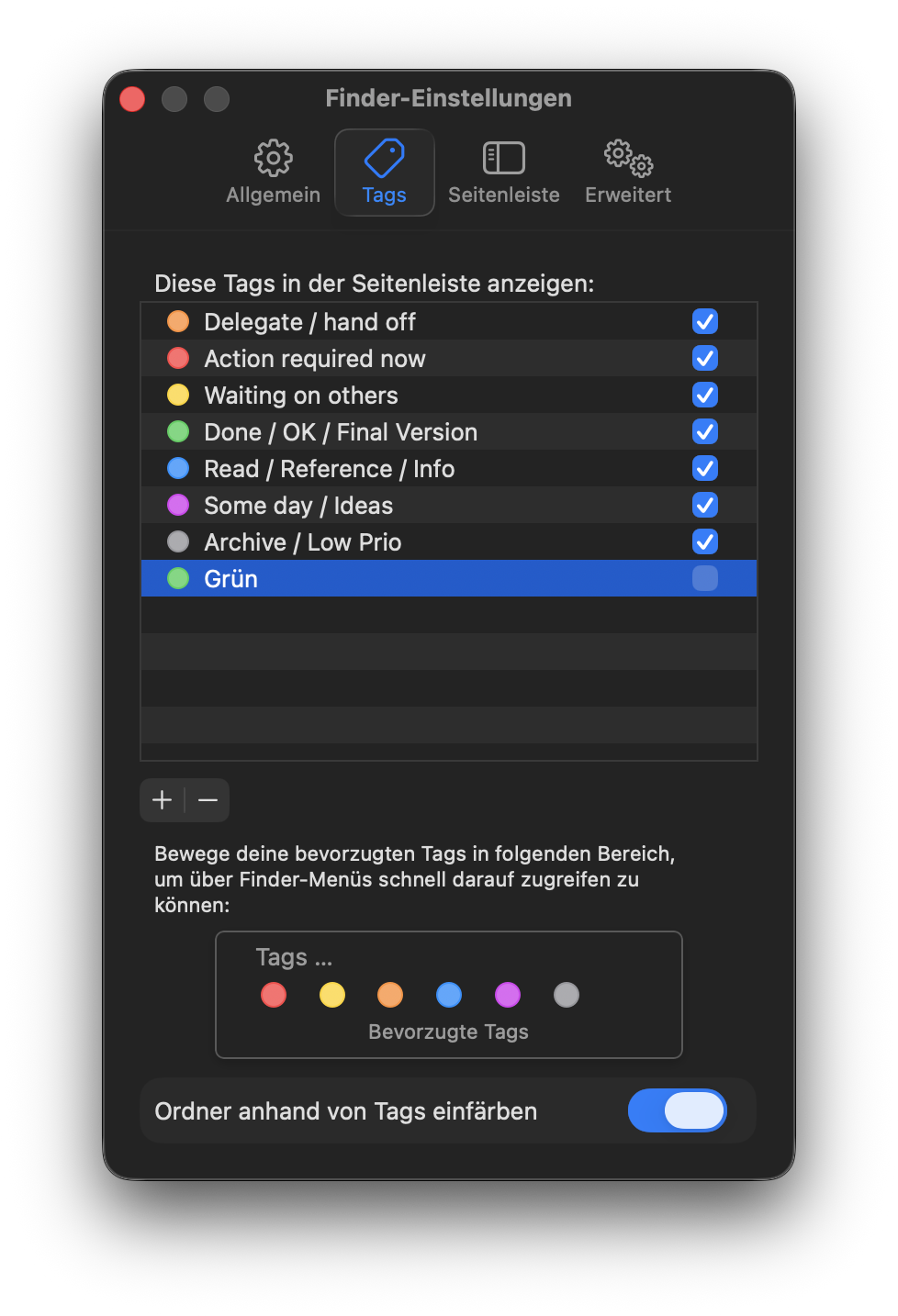
Otherwise, you create the new Tags manually, and you correlate some of the matching Labels to the new one in your Note, the new one can be same color first. Ask your local PVYai Agent to do the work for re-assigning. Most of them shall be either:
- Green: Done / OK / Final Version
- Purple: Someday / Ideas
- Blue: Read / Reference
- Gray: Archive / Low prio
After re-assignment, drag them to the Favorite Tags below. Done. Believe me. It takes the first couple of weeks some discipline, to assign a Color Label when you receive a new file or create on. The Label "Orange: Waiting on others" includes you. So when I work on a new File, which is still in a "Drafting" Stage, I flag it Orange. For sure you could add one more label for "Drafts" which i did in past.
I found out for my self, it brings me faster forward, if I flag it in Organge, because each time I look up "Waiting on others" I know immediately, what is my own file and where I shall follow-up in chat, how the Status on another "Waiting on others" is.
References – with genuinely worthwhile reading material:
Folder versus tag preference in personal information management (Bergman et al., JASIST) — https://onlinelibrary.wiley.com/doi/full/10.1002/asi.22906
The effect of color coding and layout coding on users' visual search on mobile map navigation icons (Zhang et al., Front. Psychol.) — https://pmc.ncbi.nlm.nih.gov/articles/PMC9792669/
Revisiting Whittaker & Sidner's "Email Overload" Ten Years Later (Fisher et al., Microsoft Research) — https://www.microsoft.com/en-us/research/wp-content/uploads/2006/11/p309-fisher.pdf
The PARA Method (Tiago Forte, Forte Labs) — https://fortelabs.com/blog/para/
Review and Analysis of Color Coding Research for Visual Displays (Christ, Human Factors) — https://journals.sagepub.com/doi/abs/10.1177/001872087501700602
Color-in-Context Theory (Elliot & Maier) — https://psycnet.apa.org/record/2012-12724-002
Consider It Done! Plan Making Can Eliminate the Cognitive Effects of Unfulfilled Goals (Masicampo & Baumeister, JPSP) — https://psycnet.apa.org/record/2011-12522-001
What a to-do: studies of task management… (Bellotti et al., CHI) — https://dl.acm.org/doi/abs/10.1145/985692.985785
Taking Email to Task (Bellotti et al., CHI) — https://dl.acm.org/doi/10.1145/642611.642672
Cognitive control in media multitaskers (Ophir, Nass & Wagner, PNAS) — https://www.pnas.org/doi/10.1073/pnas.0903620106
The Magical Number Seven, Plus or Minus Two (Miller, Psychological Review) — https://labs.la.utexas.edu/gilden/files/2016/04/MagicNumberSeven-Miller1956.pdf
Introduction to labels (Todoist Help) — https://www.todoist.com/help/todoist/features/introduction-to-labels-dSo2eE
The GTD Approach to Linking Next Actions and Projects — https://gettingthingsdone.com/2020/06/the-gtd-approach-to-linking-next-actions-and-projects/
GTD Contexts — Theoretical & Practical Guide (FacileThings) — https://facilethings.com/blog/en/gtd-contexts
Gartner: Digital Workplace topic page & 2025 GenAI productivity press release — https://www.gartner.com/en/infrastructure-and-it-operations-leaders/topics/digital-workplace
Forrester's Digital Workplace Model — https://www.forrester.com/report/forresters-digital-workplace-model/RES180974
The Eisenhower Matrix (Asana) — https://asana.com/resources/eisenhower-matrix
How to Prioritize Tasks Effectively Using the Eisenhower Matrix (HBS Online) — https://online.hbs.edu/blog/post/how-to-prioritize-tasks
Inbox Zero Method (Superhuman) — https://superhuman.com/learn/email/inbox-zero-method
Measurement of Perceived Importance and Urgency of Email (Lanctot et al., JCMC) — https://academic.oup.com/jcmc/article/27/2/zmac001/6548841
Gmail on X: default star/"Important" label colors changed for accessibility — https://x.com/gmail/status/2100358267004428541
The Science of Managing Our Digital Stuff (Bergman & Whittaker, MIT Press) — https://muse.jhu.edu/book/48837/
Email Overload: Exploring Personal Information Management of Email (Whittaker & Sidner) — https://www.researchgate.net/publication/221519353_Email_Overload_Exploring_Personal_Information_Management_of_Email
Enhancing the experience of users regarding the email classification task (Armentano & Godoy) — https://www.sciencedirect.com/science/article/abs/pii/S0950705114002895
Progressive Summarization (Forte Labs — "actionability, not meaning") — https://fortelabs.com/blog/progressive-summarization-a-practical-technique-for-designing-discoverable-notes/
How Do People Organize Their Desks? (Malone, ACM TOIS 1983) — https://www.researchgate.net/publication/220515815_How_do_people_organize_their_desks_Implications_for_the_design_of_office_information_systems
The Vocabulary Problem in Human-System Communication (Furnas, Landauer, Gomez & Dumais, CACM 1987) — https://dl.acm.org/doi/10.1145/32206.32212
Finder tag keyboard shortcuts: Control-1…7 add/remove favorite tags, Control-0 clears all (Apple Support Discussions) — https://discussions.apple.com/thread/254107531